
- Softonic Rating:
- Very good:8/10
- License:
- Free
- Added:
- February 13, 2006
- Updated:
- February 26, 2008
- Publisher:
- Website
- File size:
- 21.4 MB
- Downloads:
- 17,304
- DownloadFree
“Turn your DVDs to DivX, MPEG, VCD or including XVCD via your Mac OS X”
by Cyril Roger
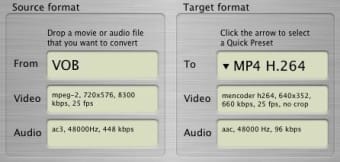
When there barely was any decent application to convert to DivX, ffmpegX was a true godsend. The application is still a very good converter which handles a lot of audio and video formats, but it now faces competition from newer and very reliable alternatives.
After nearly a two year wait, during which we really thought ffmpegX had been abandoned, the application finally got an update, which fixed a few minor issues, yet still keeps the old, Panther like interface.
Converting media is generally quick and easy, and one of the strengths of ffmpegX is all the different audio and video formats you can choose from. The program also includes a rather basic, yet necessary, media player so you can preview your newly encoded videos before burning them or storing them on your mobile device. If you dig in the settings you'll see you can perform all sorts of advanced functions like joining, fixing or authoring videos and creating an img. Advanced users will also be able to set bitrate and all sorts of video parameters.
Another strong point of ffmpegX is that it can convert your subtitles, not only to DVD Studio Pro 1.5 format but also to the more common SRT format. This, and the range of encoding formats to choose from, still make it an essential tool for any true video addict.
Still, ffmpegX is not for beginners, as it is filled with settings and tools, that only confirmed users will feel comfortable with.
We hope that we won't have to wait as long for the next update, and that ffmpegX will keep offering new encoding features. For now, it still remains an excellent audio and video encoder with great subtitle support.
Languages:
English
ffmpegX supports the following formats:
MPEG-1, MPEG-2, MPEG-4, DIVX, XviD, non-encrypted VOB and VIDEO_TS, Quicktime .MOV, .DV, .WAV, Real Audio, Real Video, H.263, MP4 H.264, PGM, YUV, PPM, AC3, PCM8/16 bits, mulaw/Alaw, WMA-1/2, SUN AU format, MP2, MP3, AAC, 3GP, FPS1, ALAC, DivX, AVI XviD,
Notes:
With this new version you are required to download a new version of the mencoder and mplayer binaries even if you already installed ffmpegX before. Copy the binaries into /Library/Application Support/ffmpegX or use the self-installer (ffmpegX menu in the apple bar, "Install binaries")
Recent changes in ffmpegX:
- Fixes for Leopard compatibility
- Added iPhone preset
- Added metadata in FLV encoding (to enable progress indicators in Flash video playback).
OS requirements for ffmpegX:
- OS: Mac OS X
Minimum requirements:
- Processor: Universal Binary MHz
- Mac OS X 10.3 or OS X 10.4
- Supports lots of formats
- Quick and reliable
- Handles subtitles
- Advanced tools (join, fix, img, authr)
- Set bitrate and video parameters
- Not often updated
- A little complex
Featured program
Softonic gives special recognition to software of exceptionally high quality. More information
From the publisher of ffmpegX
ffmpegX is a Mac OS X graphic user interface designed to easily operate more than 20 powerful Unix open-source video and audio processing tools including ffmpeg, the "hyper fast video and audio encoder", mpeg2enc, the open-source mpeg-2 encoder and multiplexer and mencoder, the mpeg-4 encoder with subtitles support.
Features:
- Drop a file, choose a destination format, and click "Encode".
- Many conversions are faster than realtime.
- Queue encodings in the ffmpegX Progress window.
- Includes a full-featured universal video player (mplayer) supporting VOB and text subtitles, with choice of fonts, font sizes and international text encodings including Japanese, Chinese, Russian, Greek and more.
- Supports subtitles in VobSub, SubRip, MicroDVD, SubViewer, Sami, VPlayer, RT, SSA, AQTitle, JACOsub and MPsubt formats
- Allows creation of DVD selectable subtitles
- Includes a subtitle converter with OCR from VOB image format to SRT text format.
- Includes a bitrate calculator to control best image quality and target filesize.
- Includes an automatic crop tool.
- Includes a series of video tools like split, join, fix, mux, demux.
- Compresses a non-encrypted DVD to 4GB without reencoding it.
- Reauthors SVCD as DVD.
- Creates DVD image files from VIDEO_TS folders.
- Converts SRT subtitles to DVD Studio Pro 1.5 format.
- Creates AVI or MPG files with two audio tracks.
- Authors as VCD or K/XVCD (.bin/.cue files for burning with Toast by dropping the .bin into VCD window).
- Authors as SVCD, CVD or K/XSVCD (two .img files to be burned in Toast under Multitrack XA window).
- Authors as DVD (/DVD/ folder for burning in Toast DVD mode, and .img file for burning in Disk Image app or Toast disk image mode).
Sponsored Links
Programs similar to ffmpegX
ffmpegX options
User Rating
14 ratings- Usability
-
- Currently 8/10.
- Stability
-
- Currently 9/10.
- Installation
-
- Currently 8/10.
- Functionality
-
- Currently 9/10.
- Appearance
-
- Currently 8/10.